Thursday, March 12, 2015

Eritrea E30FB revisited 30M CW skimmer demo


Tonight I was able to video working the 30M E30FB pileup.  


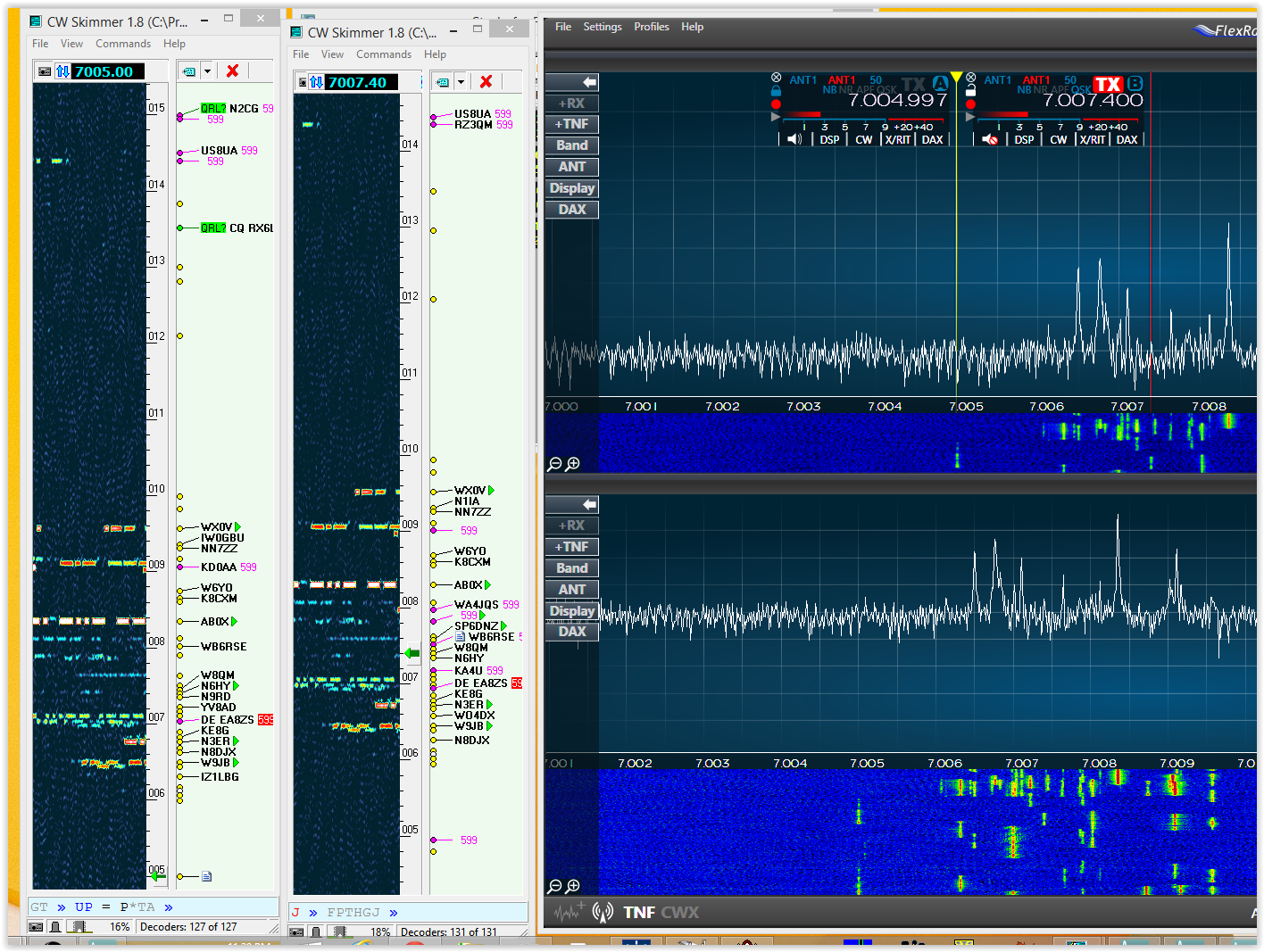
As you can see the pileup was pretty big at about 10 khz and also quite dense as the DX op was not spreading them out too much.  His pattern was to move up into the dense part of the pileup and start to descend fairly quickly working stations he could hear until he got near the bottom and then pop back up 5 or 6 khz up the band.  Being able to discern this pattern made working E30FB fairly easy.  He was not super loud often fading out but he was rapidly in and out not big long fades.  I was able to copy enough to stay ahead but not too ahead.  

I made a video of the encounter and you can see me move down the band.  It's a strange technique as I'm perusing him by letting him unknowingly pursue me.  I got all the controls adjusted AGC-T, audio level, turned off the AGC played with the APF etrc and made sure the Flex was feeding my OBS screen casting software.  Once satisfied I located him in the pileup and switched on the video and commenced to calling around 01:17 Z.  Skipping around the pileup I finally bagged the QSO around 1:22 Z.  5 minutes for a new one on 30M.  Color me happy!


For some reason my sidetone does not make it to the screencaster.  Haven't figured that one out yet.

73  W9OY


Wednesday, March 11, 2015

9Q0HQ Dem Republic of the Congo


One of my favorite things is to run across a DXpedition that's a new one for me.  I reset my DXCC last June when I started using the Flex 6300 in earnest.  9Q0HQ is my 231 st country since June.  I've also been angling to record a DX contact to demo how I use skimmer.  I thought this was that contact but the audio wasn't turned on so woe is me.  One of these days...


This is my latest favorite configuration.  I have both slices (VFO's) in the upper pan and the lower pan I use to monitor something.  In this case I'm basically monitoring the same freqs as the upper pan, but I'm using the lower pan to feed a separate skimmer for a total of two.  


 Each skimmer decodes independently so the callsign list in one is not exactly the list in the other, giving me a greater insight into the behavior of the pileup and where the DX is listening.  I use the skimmer closest to SSDR as my VFO B tuning device.  I lock VFO A so if I bump something the DX doesn't go flying off freq.  I use very tight 50 hz CW filters and 5 hz is enough to be off freq 

The station was fairly loud with QSB  I have a 1/2 wave end fed vert over about 4000 ft of wire as one ant choice.  The vert is a very effective low angle radiator,  My second choice is a G5RV style dipole up about a half wave, which is also effective but not nearly as low angle.  9Q0HQ is about 6700 miles strait shot over water from my QTH and tonight the dipole was slightly better.  I also have a N4UQ tricked out Alpha 78 amp which I hardly ever use, but I decided to use the amp more.  It does perfect QSK and puts plenty of fire into the wire but it does tend to heat up the shack compared to my solid state amp.  No matter this is a honey of an amp.

The pileup was pretty dense as the DX didn't spread things out much.  He was working up and down in about a 1.5 khz range even thought the pileup was spread over about 6 khz  It is SOOOO nice to be able to figure this stuff out at a glance.  After about 15 minutes he was in the log


73  W9OY

Sunday, March 8, 2015

E30FB Eritrea


Eritrea is on the air!  I've been chasing them on 20 and 15 and for a while on 40 but no luck till tonight  


I had the 6300 set up in minimalist mode so I could make a video.  They were pretty weak and the band was quite noisy.  I used my dipole as the noise and signal strength was worse on the vertical.  I was running about a KW.  I had skimmer set up, and after I determined his pattern I just tail ended a signal.  In about 3 calls he was in the log


I made a video demonstrating click tuning skimmer but I had already worked him so I didn't want to add to the QRM.  I was hoping to get my QSO in the video but I had a little problem with my audio feed to the screen caster so that didn't pan out this time.  The band was somewhat unsettled and I decided WFFL (work first fix later) Maybe next time


73  W9OY


Saturday, March 7, 2015

FRStack Registry stacking utility

The cool thing about the Flex system is the ease with which utilities can be built by users for the radio and then shared with the user community.  Back in the "old days" of Flex Radio the community was very collaborative with the company and many features were added from that interaction.  The problem with that as the software became more complex is the addition of one thing would tend to break another, or cause confusion in implementation requiring trouble shooting etc.

Flex came up with a server/client model to be used with their radios and published a API so intrepid developers could access the radio via its API and therefore add features and functionality to the radio without Flex having to formally incorporate the idea in the actual hardware.  The API is accessed under the server/client format over the ethernet so programs and utilities created can be resident on any computer connected to the radio whether it be the 'puter in the shack or the 'puter in the den or the 'puter (intranet) at the office over the internet.  The intranet accessibility is soon to go live with V 1.4 and soon enough internet will follow.

Several clients have been written using this interface and are in use by thousands of Flex aficionados.  DDUTIL v3 by my old buddy K5FR is an example of a very powerful program that interfaces the Flex with the rest of the station ie watt meter, amplifier, steppir antenna, macros, all kinds of things.  Another program is SDR-Bridge by another old buddy W2RF.  This program is a DX contest interface of sorts.  It combines up to 4 channels of DXskimmer to 4 channels of DAX I/Q wideband audio, each being linked to a separate panadapter.  Ed W2RF also has developed some specific split functions in SDR-Bridge which dramatically improves workflow when doing battle in a pileup.  These are examples of the power of the Flex API.

Mark AA3RK wrote a piece of software that expands he capability of the memory system in the Flex called the FRStack.  The FRStack talks to the radio via the API and stores the most recent frequencies to which the radio has been tuned, up to 4 recent band stack points are remembered.


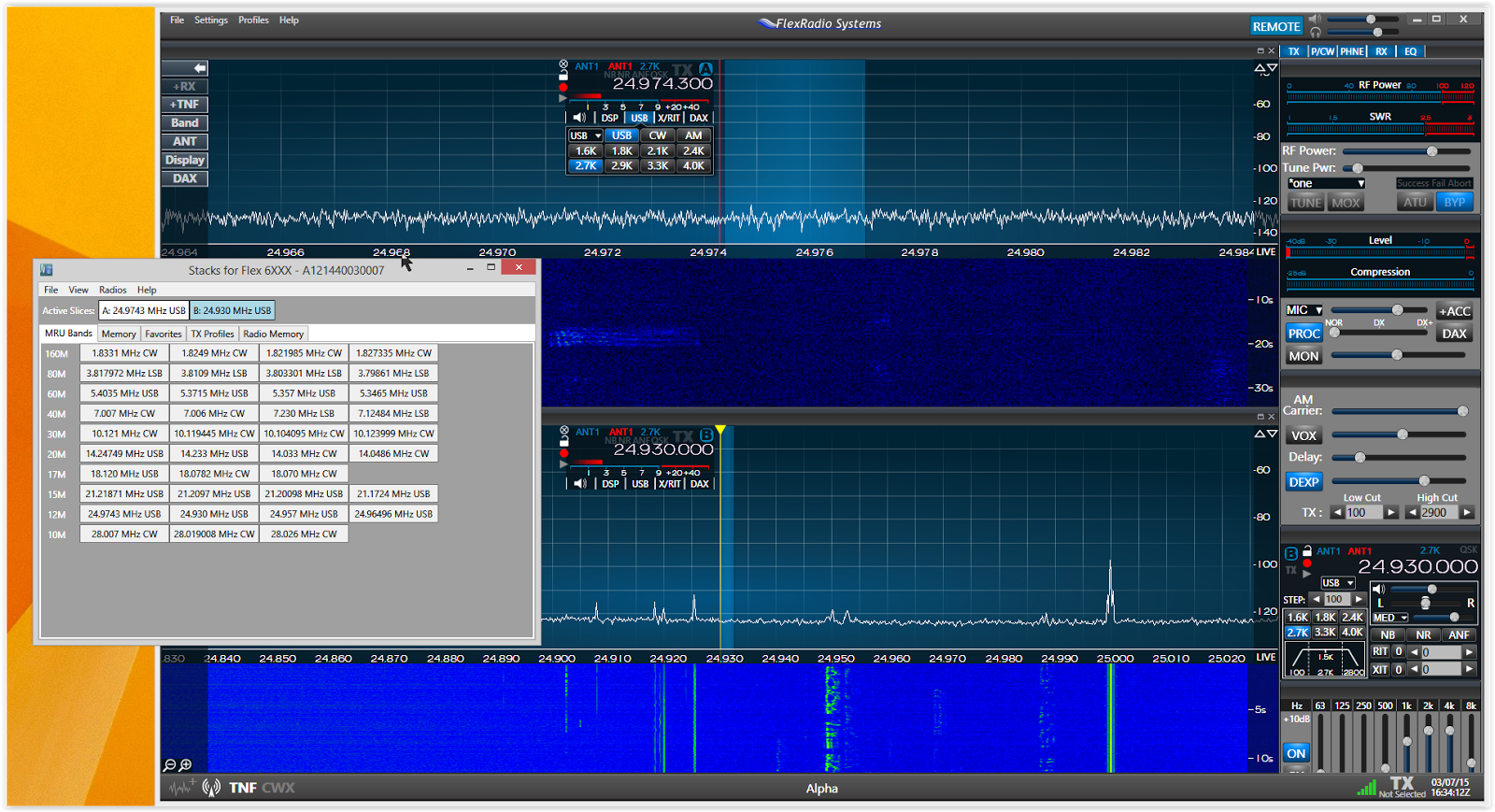
This is a shot of my 6300's band stack database.  Why is this useful?  It allows you to have a record of recent freqs visited.  For example if you are listening to a rag chew on 14.300 and a pileup on 14.230 you can flip back and forth between the 2 freqs just by clicking on the one you want.  There is a way to shoot the stack memory into a panadapter of your choice.


In this shot I have 2 panadapters open.  To send a stack memory to pan A I highlight pan A and click the stack memory I want sent there.  In the above spot pan B is highlighted and I just sent 24.930 into its freq display.  

The specifics of the radio setup is also remembered. Things like mode, filter bandwidth, antenna choice, DSP setting etc for each Stack point in the data base.  


When I send 7.007 to a panadapter ALL of these parameters are transferred and configured.  This is just the beginning. The band stacks are volatile.  4 freqs per band are remembered.  When you tune to a freq the freq won't show up in the band stack for about 10 seconds.  This avoids a constant flow of data from being remembered and only data for which you dwell on that freq for 10 seconds will be stored.  4 of these data points are stored and then its FIFO.  So if you dwell on 10 freqs on a given band only the last 4 will be remembered.  But you can put things into memory for long storage


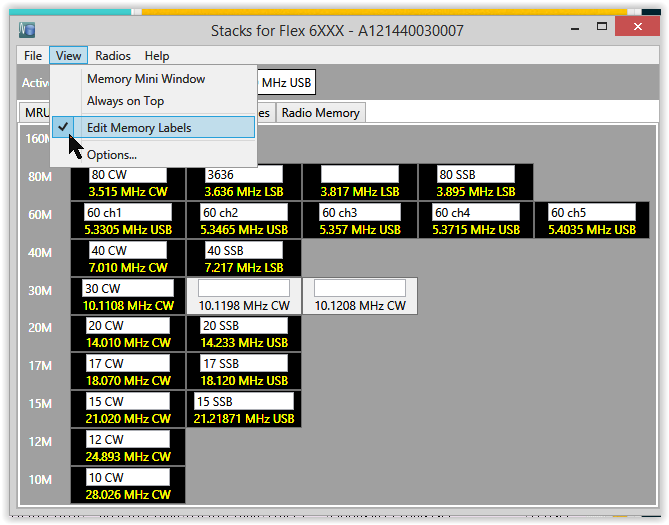
This is my memory screen.  The white blocks are long term memories of no special consequence.  The actually are memories of a pileup I was stalking on 30M, one for VFO A one for VFO B.  The program allows you to put labels on these long term memories either regular memories or favorites. 


So if you are listening to 3 pileups you can label which pileup is which.  I often do this if I am working on say 20M but waiting for a station to build on 40 or 80.  If for example the station is in the Indian Ocean I can monitor the pileup in EU and listen to that build while I am waiting for my turn at propagation.  I can often hear the propagation fire-up across EU starting in Russia then to Poland/Czech/Hungary, then France/Germany/Italy and Spain and finally England.  I just click back once in a while and listen for what I can hear.  

The other feature is favorites 


Here you can designate certain freqs as virtually permanent because you use them all the time.  I use this feature as a means to select either the CW or SSB portion of the band, and as a means to choose the 60M channels.  If I was interested in digital that would be included here as well.  Remember all of the channel info is stored so special choices you have to make like audio paths and input gains between a digi program and the Flex are remembered into a one press choice.  There are more choices like transmit profiles which can be used to further refine choices and radio memory, which I think writes the memory actually into the radio for storage but I haven't really explored these options.

I keep FRStack tucked behind SSDR:


Ready for immediate access


It is an extremely versatile utility that exists on its own, does what it's supposed to do, causes no trouble in terms of affecting development, and does not take up any room in the FPGA.  It is a good example of how Flex's insight in developing their API and server/client model can be leveraged by users to dramatically expand functionality.  I like it!


73  W9OY



Friday, March 6, 2015

How to record SSDR

I've been playing around with screen casting and settled on a new favorite screen caster called Open Broadcast Software


or OBS for short.  The software is free and can be made to both record the screen and allow audio over dub to highlight and explain what is on the screen.  It also can be made to output a .mp4 file which is important to me because I don't have a native .flv player, and downloading that kind of software makes me nervous.  .mp4 is prefect for storing and exporting to youtube or other video sites.

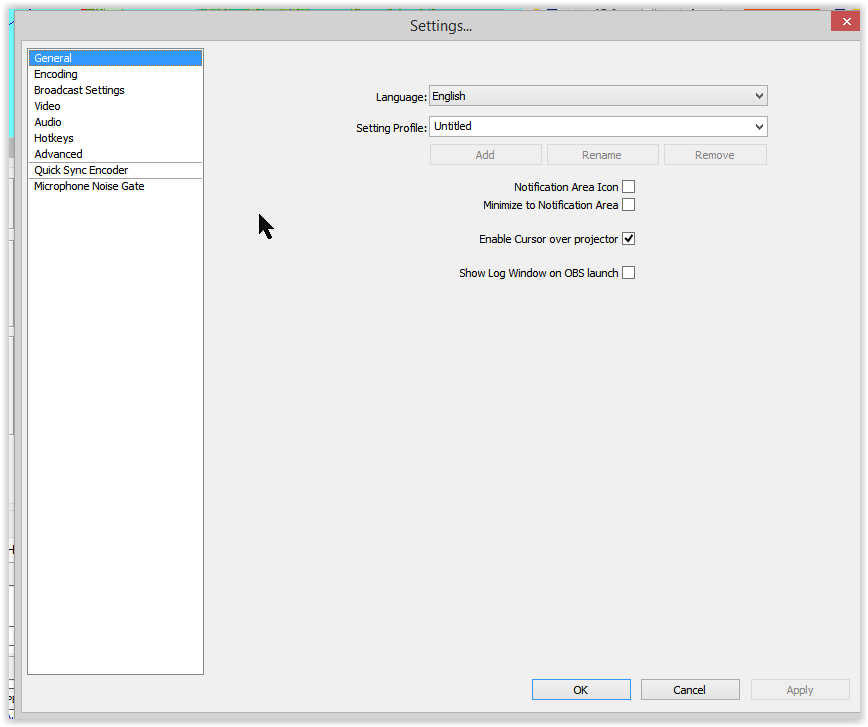
Simply download the software from the above site and install.  Here is how I set mine up.  Go to settings and set up each category and once set you have to "apply" each screen to get changes to take effect.


On the next screen I changed a couple things:


Since I don't intend to do any live screen casting I changed the mode to File Output Only, and under file path I changed the file type from .flv to .mp4.  My files now will out put as MP4 which I can view in windows media player. and I can share files in this format so others with windows computers can view my files.  

Video I left in the already chosen custom choice.  I debated changing it but decided to give the default a try and it seems to work fine like this


Next is audio

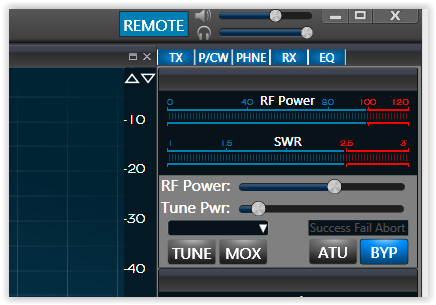
Audio can be set up a couple ways.  When version 1.4 is published you can simply use the new remote button on SSDR and choose defaults, assuming your PC mic and speaker are defaults


This will route excellent low latency audio to OBS.  If you are running pre- 1.4 then DAX is your ticket


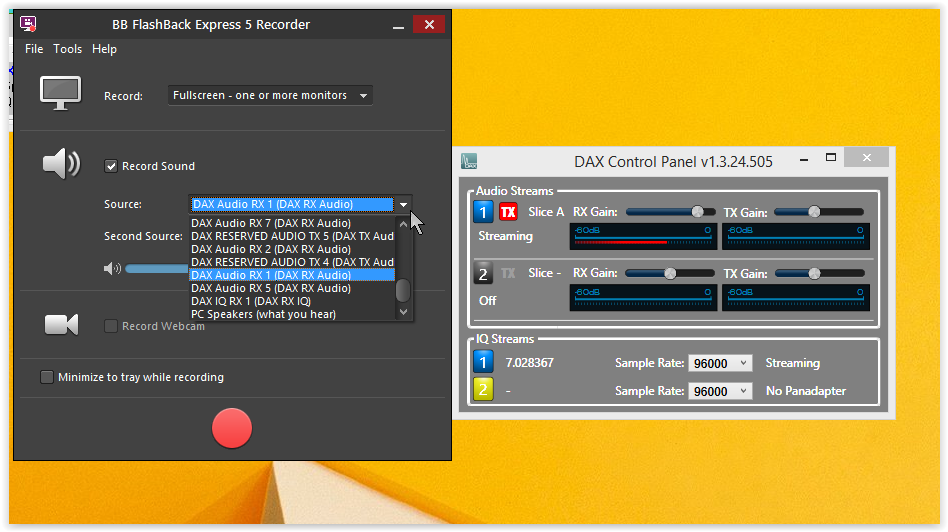
The Desktop audio device I chose was DAX RX 1 which picks up the audio feed from DAX RX 1.  In order for this to work DAX RX 1 must be turned on in the DAX control panel


When first setting up I had a little trouble with the choice in "audio" being persistent but it seems to work fine now.  The point being if things don't work just run through the setup and check to see if things are in fact setup.  for Mic audio I chose "default".  My default windows PC recording device is the headset I have plugged into the front panel.  This needs to be set up correctly in windows sound under "recording devices"

right click "speaker" in the tray bottom right then click "recording devices" then scroll to the device you want, right click and set as default.  If it's already default it will have a green check


I set up a couple hot keys


I checked PTT and chose space as the PTT key.  For this PTT to work OBS has to be the window in focus, but I don't intend to do much yakking except to give quick explanation so this works perfect fo me so you don't have breath sounds and clicks on the line while recording.  I also put CTL-X to start and CTL-S to stop

I didn't change anything on advanced


or Quick Sync


and did turn on the noise gate


To get enough volume on my mic I had to turn on the boost in windows sound

right click speaker > recording device > mic > properties (right click mic) > levels 


I had to add a scene and a source by right clicking the box and adding.  I use monitor capture as I use 2 monitors and I capture monitor 2 which s the monitor with SSDR


That's pretty much it!  Files will show up in your video folder date and time stamped.  To record hit "start recording" or CTL-X and to stop "stop recording" or CTL-S with the OBS window in focus.  To overdub press the space bar.  

I have a dropbox basic account which I think is good for 16 gb of free storage or you can use ADRIVE  which after jumping through a couple hoops is good for 50 gb free.  Both of these accounts allow you to share you video files with a friend by using a secure email link.  It's a convenient way around the email attachment limit.  

You know the closer I look at you the more you look like Alfred Hitchcock! 

A super easy way to shift the mic and audio from the Flex radio to the computer is to click the new remote button on SSDR.  click remote and audio goes to PC click remote off and audio reverts to normal.  Coming soon to a PC near you..


Here is an uploaded demo on youtube.


73  W9OY


Sunday, March 1, 2015

Band Noise

On eham I was in a discussion asking why the band noise seemed to slope up in my radio.  Here is a shot with no antenna connected to the 6300 on my RF patch panel.


This pic shows my spectrum from 1 mhz to 8 mhz.  Nice and flat with a couple spurs in the BC band.

Here is a pic with the freq flag at 1.8 mhz and my 80M vertical inserted into the 6300's antenna jack on the patch panel.


This pic shows the BCB band to a little over 7 mhz.  Notice how quiet 160M is.  The peak around 3.7 mhz is the resonance of my 80M full sized 1/4 wave antenna.  I can switch the picture by switching to my 40M 1/2 wave vertical fed through a resonant parallel network 


Here is up to about 10mhz on the 80M 1/4 wave.


I used this method to discover what the strongest signal presented to my ADC was and it turns out to be whatever station is on 7305 (this is on the 40M antenna)


He is peaking -37 dBm or so which is 46 dBm below where my radio crunches aka +9 dBm.  On the 80M antenna the culprit is Radio Havana at 6mhz but they are still 39 dBm below crunch time.


73  W9OY


Video madness

I recently upgraded my processor to a 65W i7.  I wanted to try some screen casting.  I use the 4600 graphics processor which is onboard to the i7 and that drives 2 1080p monitors.  Finding a screen caster has proven to be a chore.  I have decided to try proven to be a chore, but I have decided to try BB Flashback Express.  I'm using the free version which is somewhat crippled in its feature set but I can record and publish in the .flv or .api format.  It's pretty easy to publish the .flv to youtube.  If I become addicted to this I may paythe $89 to upgrade which will allow me to voice over the video and add some labels and struff like that.  Be very afraid!  These are best viewed in full screen HD 1080p


This is a demonstration of the 6300's DSP capability in the ARRL 160M SSB contest.  This is high RF environment as the band is full of high power contest stations so I figured it would be a good test. I'm listening to TO66R and stations working him..  Also on freq is S57O under TO66R.  If you listen you can hear him with the DSP active but he would be entirely uncopiable without DSP  I also change filter BW.  Many people complain the DSP in the 6000 series "doesn't do anything" but without it S57O would be completely uncopiable.   You can judge for yourself.  This video is so 160M.  Listening to 3 different parts of the world NA, Caribbean, and EU all on the same freq.  This was my first attempt with BB express.  I use DAX audio strait off the radio to drive the recorder.  It was dead simple to set up


I was having such a good time playing I decided to record tuning around the 160 test from the bottom of the band and up.  


I got a little better at setting up BB Flashback.  It was cool to use the waterfall to click tune and it was interesting to see how well the radio does in separating stations.  There were many stations that overlapped but none were uncopiable because of it.  This radio has a REALLY good receiver!  ewas really interesting was the memory the waterfall provided.  Even though a signal was a dozen seconds in the past I could click the waterfall on the last seen signal and would basically be right on freq when the next call came around.  I used the FlexControl to fine tune.  This is immensely helpful to contest efficiency and work flow.  I basically just click tuned right up the band and had covered every station between 1800 and 1940 in like 9 minutes including the DX!

A friend sent me a cell video of his new 6500 and Anan100D comparing the APF.  I decided to make my own video.


The 6300 is on top and the audio is a little different.  I mix the headphone audio from the Anan and from the 6300 in separate channels on a professional mixer.  I tried to set both radios to best AGC-T.  Both are connected to separate verticals and both are set to 50hz and AGC-fast.  I can't really tell much difference but I think the Flex is a bit quieter.  

I'm going to try and capture a CW DX pileup next 

73  W9OY

NOTE:  all of these tests were conducted with SSDR software version 1.3.1.23 or 1.3.1.24  As the radio improves and new software is introduced expect improved results.  These videos are just a spot in time.  The advantage of SDR is the improving software.