Friday, April 15, 2016

EP2A on RTTY


I've made about 2 RTTY contacts in my life.  I worked W1AW/3 and W1AW/9 using the 6300 and Winwarbler from the DXLab suite back in 2014.  The setup was kind of primitive in those days and the only way I could figure how to run split was to use XIT.  With the redesign of DAX in the most recent SSDR release 1.6.21.77 it has become child's play to set this up with 2 Slices.

My goal was to see if I could hear EP2A which started a DXpedition today, a day early.  They were on 30M RTTY.  I've gone through several computers since 2014 and never bothered to set up any digital modes, so I figured I'd at least set up RX and see if I could print them.  I scratched my head for a few and opened up WinWarbler and set up the Flex DAX channels which are recognized by WW as virtual sound cards.


I set up the RTTY tab


I then turned on the DAX channels in the DAX control panel.


And made sure I had DAX 1 turned on in VFOA


Set the transmit profile to RTTY default 


And the mode and filters to RTTY, 400hz BW


And the dang thing started decoding


He had a pretty good signal so I decided to see if I could get TX running also.   Flex used to have a separate TX and RX audio channel for each slice but in the redesign they collapsed the TX channel down to 1, and made that channel follow the TX flag in the slice.  This way your TX signal simply followed which slice was transmitting.  Super smart move.  This makes working split child's play, and improves compatibility with terminal programs.  No more XIT and no more guessing where you are transmitting, and I could click tune the pan adapter to my heart's content.  So I set up that DAX channel and hit start in WW and nothing happened.  When in doubt RTFM.  I googled "Flex RTTY DXlab" and found this document  All I needed to know! 

I next set up PTT which was the missing link and the reason nothing happened.  DXLab connects to my Flex in a client/server fashion with it's own IP address instead of via CAT so I didn't have to mess around trying to get CAT ports to fire PTT.  Can you say BLESSING!


And added a couple of macros to WW's alternate macro screen


This allowed me to start send my call 3 times and stop with 1 button press.  The second sent  start W9OY 599 and TU stop.  I turned down the power in the 6500 and did a couple dry runs and things worked perfectly, so I cranked the power back up and commenced to try and figure out where EP2A was listening


I was getting along to their sunrise and signals were variable with slow QSB but occasionally he would peak.  I noticed on their website they have a 4sq on 30M and 40M so maybe he was just changing directions between calls.  Like I said I'm a RTTY pileup novice aka one step above clueless.   Though the pileup was pretty big and dense he was calling CQ quite often so I'm not sure if he was having trouble hearing or what,  I had good luck with the Iran path before so I was confident this would pan out. (That's a pun as in panadapter)


I guessed his RX freq correctly by watching the too and fro between contacts in the panadapter, and in just a few calls he was printing my contact info.


So instead of wondering if I could hear him I wound up working him!  My first RTTY DX contact, running split to Iran.  TOO MUCH FUN

73  W9OY

I'd like to thank Dave AA6YQ, the brainiac behind DXLabSuite.   He did the work to move DXLab beyond CAT interconnection to full DAX and IP compatibility.  Also thanks to Flex who created the API in SSDR to allow this tight integration to occur.  It was this combo that made my setup so quick and painless.  


Friday, April 8, 2016

Why I own a Flex 6500

The VK0EK and FT4JA DX peditions are occurring simultaneously.


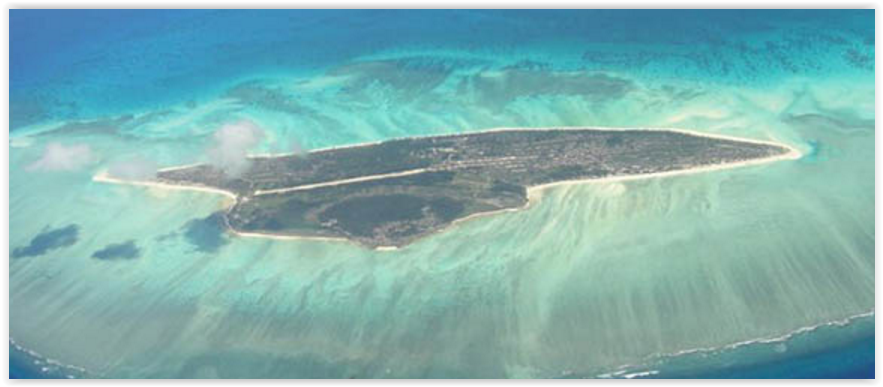
 You can see on this map the two entities displayed.  FT4JA is the blue dot next to Madagascar and VK0EK is the sub antartic red dot at the tip of my mouse cursor.  So how do 2 DX peditions, #4 most wanted and #5 most wanted pileups coexist on the same band?  They make a co-ordinated plan.

This is the plan for 160M


The VK0EK pileup is planned to occur in the red zone and FT4JA's pileup is planned to occur in the blue zone.  Tonight I got to see the plan in action and it worked quite well.  The 2 DX-peditions had NO cross interference.


The upper panadapter is devoted to FT4JA.  You can see 2 slices A&B are devoted to him.  VK0EK is the lower panadapter.  Slices C&D are devoted to him.  2.5 khz separate the pileups.

Here is a shot of the whole thing displayed on 1 skimmer


FT4JA is transmitting on 1821khz and VK0EK on 1818.5khz.  There is a lot of RF slinging around the band yet my band noise is about -110dBm on my vertical.  If I want to call FT4JA I set the TX Flag to slice B as above.  If I want to call VK0EK I set the TX Flag on Slice D.


Both stations are represented in my headphones and I have VK0EK toward the left and FT4JA toward the right 


I can set my TX freq simply by clicking the proper TX slice and moving it where I want.  You will note I have the blue locks applied to the RX slices so If I grab the wrong slice it won't move.  The plan sounds good in theory but with the 6500 it plays for me in multiple dimensions.  I don't think any other radio save the 6700 has this kind of versatility.

This radio was built from the ground up as a screaming DX machine.  It is flat out amazing.  I haven't worked them yet but we will see.  I would LOVE to get either one of these jokers on 160.

Here is the setup converted from 160/160 to 160M and 40M.  It took less than a minute to convert.  I lost VK0EK on 160M but I was able to hear him on 40M so I merely switch the VH0EK slice pair C&D from 160M over to 40M and open a second skimmer, and turned on the correct DAX feed, so I have one skimmer for 160M and one for 40M.


  Using SDR-Bridge with these 2 slice pairs allows me to set up click tuning on the skimmer screens such that I can tune pairs A&B, and C&D totally independently.  

By setting the correct Split flags in SDR-Bridge I am able to click tune around either pileup while searching for the correct TX freq to answer either DX station.  Click tuning the 40M skimmer sets my TX to 40M and clicking the 160M pileup sets my TX to 160M.  Since my amp and antenna follow my TX choice one click and I am ready to make the call.  I can also turn on full duplex.


To make this effective I set my RX antenna to my broad band loop and I can run full duplex on 40M and 160M receive while my transmit antennas and amp band follows my transmitter.  This means I can listen 100% of the time to VK0EK on 40M, while calling FT4JA on 160M.  If I decide to call VK0EK on 40 I never loose FT4JA in my headphones even while transmitting.


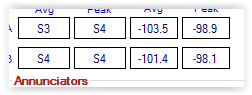
This is a picture of me transmitting 1110W of CW to a half wave vertical on 7.0167 mhz on 40M while listening to a S3 carrier on 1.825 mhz.  My TX and RX antennas are separated by a couple hundred feet.  My band noise on the RX loop on 160 is -120 dBm (S1).  It rises to about -118 dBm (still S1) when transmitting 1110W a couple hundred feet away.

73  W9OY


Thursday, April 7, 2016

5V7D Togo


There is so much interesting DX on the low bands these days.  I've been stalking 5V7D in Kpeme Togo for the better part of 2 weeks but never really heard them.  They are a 4 man DX pedition.  Tonight they popped up on my spot list on 40M but I was still 4 hours into my daylight.  Togo is about 5500 miles away on the east coast of Africa and I figured I didn't have much of a chance, but listening for DX beats reading the Drudge Report so what the heck.  At first I heard nothing, but I could see a lot of very weak trails on skimmer about 1-4 khz above his transmit freq, too much activity to be random, but too weak to copy.  


This is typical of how a pileup looks outside of my skip zone, when viewed on a quiet band.  Europe was in total darkness and the 5V7D cluster spot was by a DD5 (DL) station so I was sure I was seeing the EU pileup on 5V7D.  Up the band was a monster pileup on VK0EK who was experiencing his grayline and I could see Europe galore calling him so I knew 5V7D would soon be coming into the picture.  I parked it on 7003 and went back to reading the Drudge report (actually I was reading an article on the Raspberry Pi 3) with the headphones on my ears. I started to hear a beep once in a while so switched back to the radio and I could see him and occasionally hear him.  FL, though on the East coast is actually pretty far west when it comes to grayline propagation especially close to the equinox.  A couple weeks ago the night time hump viewed below had near vertical sides. Pensacola is actually far enough west to be in the central time zone.  I could see/hear some of East coast boys farther east than me start working 5V7D.  K1's and K3's were getting through 


Here you can see the grayline just touching Maine, this is about when I started hearing him. 


This is the pileup, looks small but I'm sure there was a ton of EU calling that was below my noise.  Eventually I heard him calling many EU stations as he bobbed in and out of the slow QSB, but the band was nice and quiet, so.... wait and plan.  I figured out his pattern and it took a while because I was competing with EU but soon enough we exchanged reports.  He wasn't very strong  


But strong enough.   TNX QSO 5V7D!

73 W9OY


Tuesday, April 5, 2016

FT4JA on 80M


Got them on 80 also.  Nice sigs, small pileup


A good S unit out of the noise.


I didn't even have to wait for grayline enhancement.  Dare I wish for 160M?

73  W9OY


TNX Jacques


Monday, April 4, 2016

FT4JA 30M


Had the rig tuned to 30M and there was a big pileup progressing so I decided to tune in.  FT4JA on Jaun de Novo good copy so I decided to join in the fun.  No DQRM but some on freq callers and some up up overall nice copy.  It was just before their sunrise 


And the sigs were thus:


peaking -90 dBm 


with an average band noise of -114 dBm  

Pretty big pileup though


He was slowly moving up and down the pile, moving on after each contact, so tailending wasn't the key.   I just moved a little higher or lower after the last QSO looking for a clear spot and sent my call twice, once for him to hear me and another for him to copy me.  He would tend to move a couple hundred hz to a khz or more, so I had to try and get into his mind a little.   After a while I managed to attract his attention and we were in each other's logs

.

Un-narrated video of FT4JA  Maybe 80M or 160M?

73  W9OY

Many tnx Pat


Sunday, April 3, 2016

New Paddle 9A5N Solid State Touch Paddle


I bought a new paddle a couple weeks ago from Neno  9A5N.  The paddle is like none I've ever seen.  It uses a MEM device as the switching element.  So the paddle is not a mechanical switch but it is not capacitive device either.  It's an electro-mechanical switch and has zero movement in the key closure.  It's more like the touch screen on your cellphone.  The interface runs through a processor and has user adjustable pressure from 10g to 50g in 5g increments.  


Over the years I've developed peripheral neuropathy which is a disease that attacks the touch nerves in my hands and feet, so my fine touch is shot.  I used to be able to touch type but now I'm two finger Louie.  I used to be a guitarist (the kind who lays out all those melodic jazz chord solo runs) and figured I'd spend my retirement playing a couple hours a day but that dream is out of the picture.  If you can't feel you can't play.  

I noticed mistakes starting to  creep into my CW as well.  I've been very happy with my N3ZN paddles, but I decided to give these a try to see if I can improve my sending accuracy.  


The feel of the paddle is completely consistent with every touch.  It is taking a little getting used to but over a couple days its becoming second nature.  I had to spend some time precisely setting the pressure, 50g is too high and 10g is too low so I'm somewhere in middle probably 25g or 30g.  

The paddles are stunning!  Heavy chrome plated steel base (1.8kg about 4 lb) and the paddle/brains are housed in a brushed aluminum chassis bolted to the base.  They do not move on the table.  Mine are custom made to my specification.  The standard paddle looks thus:


Or you can get the whole thing in black.  I was able to get serial #1 in my particular series so maybe my wife can get a little premium when I croak and she sells all this stuff.  It seems to be working as far as improving my accuracy which makes me very happy.  I HATE sending crappy CW!  The button on the side turns the thing off and on and puts you in setup mode as well the blue light under the paddle tells you when its on and it has an auto shutoff as well to save the 2 AAA batteries.  I find being able to turn off the paddle a bonus since I do a lot of typing in my shack and I'm always hitting the friggin paddle and sending out dits and dahs by mistake.  I purchased mine directly from Neno but there is an American vendor as well, just google 9A5N solid state paddle.  Neno was excellent to work with when creating my idea into a finished product.

73  W9OY