Tuesday, August 16, 2016

6700 Panadapter Hints

I was fooling around today on 40M and decided to add some macro controls to DDUTIL that controls the panadapter on my 6700 (also works on the 6500 and the 6300).  DDUTIL has a macro feature which allows one to access the radios API with simple code stored in a database


The code can be simple or complex to do one thing or several things simultaneously.  It is easy to write, just basically stringing some commands together 

9 DDTG19:083:084;

The above command allows me to toggle button 9 between memories 83 and 84

83 DD6PBW0:.019;DD6PCF0;
84 DD6PBW0:.011;DD6PCF0;

Programming is basically cut and paste with a little fine tuning to the command to make it do exactly what you want.  83 sets the first panadapter (A) to 19khz bandwidth and  centers the slice in the panadapter.  B sets the bandwidth to 11khz for a more zoomed in view


And button F9 in the DDUTIL macro box llows me to toggle between the 2


This is very powerful.  I have a macro that views 200khz of the band, 35khz, and 19khz and 11khz.  If I was a 6M guy (or any other band that covers up to 14mhz) I could write a macro that shows 50.0 to 54.0 mhz, the entire 6M band in a button press.  The waterfall acts as a memory that remembers something like 19 minutes of band data, so at 50-54 mhz I could look back at 19 minutes of history of the entire 6M band.  

I made a little video of some of the features of the panadapter demonstrating how useful, powerful and easy it is to use.


73  W9OY


Thursday, August 11, 2016

Flex 6700 Full Duplex mode Flex is going to Bouvet


It appears Flex is going to Bouvet!!  In 2018 8 Flex radios with Maestros will head to the "the most isolated island on earth".  In a recent discussion Flex was being knocked for its receive latency on CW so I decided to make a video demonstrating latency in full duplex mode.  Full duplex is how QSK was originally done.  There was a transmitter plant and a receive station and the 2 were often separated by 10 or 20 miles.  

My setup is more modest.  My TX was connected to my W5GI antenna at 50 ft in he front yard and my RX antenna was connected to my full size end fed half wave vertical over 4000ft of ground plane.  The slices were about 3 khz apart and I was running about 0.72W to keep QRM down.  Band was 40M in the daytime.  I used 100hz as my filter to give a relatively worst case scenario re: latency


FDX under various power levels


Pretty cool

73  W9OY

My Calibration Routine for the Flex 6xxx Radios

I recently bought a used 6700 and noticed it was off frequency at 15 mhz.  I never really did a calibration before but the radio was off about 40hz, too much to tolerate.


I tried to figure out a calibration routine.  Looking at the Flex Community I couldn't find any formal calibration routine except to tune to zero beat around 15 mhz and hit the calibration routine start button.  

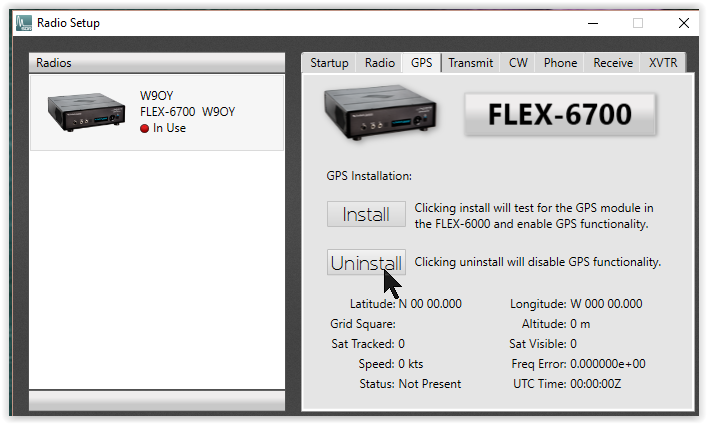
The radio has a very good internal freq source, but also can be tied to an external GPS source that trains the oscillator to very high accuracy.  My radio does not have the external source.  If you have GPS turned on but don't have the GPS oscillator installed the radio will default to 0 in the ppb calibration window every time you reboot.  The solution is simple, hit UNINSTALL in the radio setup > GPS window


I first set the freq offset to 0 in the receive calibration window.  Erase what's in there and enter 0 


Since the 6xxx radios have multiple slice receivers I decided if I created 2 slices and set one to USB and one to LSB I could superimpose the 2 slices and when both USB and LSB slices were zero beat with WWV that would be the freq to which I would calibrate to create the offset


I have 2 Flex controls which made tuning easy but if I had no controls I would simply use direct entry in each slice window of freq's until zero beat was attained.

I next hit start on the receive window


And the calibration routine calculated the correct offset 

I then double checked and set each slice was zero beat at 15 mhz


Houston we have zero beat!!  This worked great.  I did a few iterations and my error was always +40hz, so since I now know my error, if I ever want to re calibrate, I can simply tune my radio to 15.000.040 and hit start.

I made a video for your viewing pleasure 


Easy as Pi 

73  W9OY

Note: if your radio does not remember the correct offset between reboots you may need to do a hard reset of the radio's database  Press and hold OK then power on and wait for the countdown in the 6700 or 6500 or long press power in the 6300 and then go through the calibration routine.  

Monday, July 18, 2016

Global AIS on Space Station (GLASS)

Global AIS on Space Station (GLASS) is a project designed to locate ships at sea using the International Space Station.  The problem is once your ship gets 75KM from shore it becomes invisible in terms of location.  The ISS effectively "views" the entire surface of the earth as it orbits, including the oceans.  Here is a short video describing AIS 

https://www.youtube.com/watch?v=TrsKZma-LTk

The project has been progressing for several years and is now ready to move to a new phase.  The ships transmit location data around 160mhz which is received and processed into a database which is then up-linked from the ISS to a satellite which then downloads the data to a ground station.  The hardware chosen to "receive" the 160mhz signals from the ships is the Flex 6700R, the receive only version of the Flex 6700.  It was chosen because of it's 8 receiver capability, it's custom program-ability via the API, and data transmission via the radio's internal DAX circuit.  Last night 2 stock 6700R's blasted off on a SpaceX Falcon 9.  Here is a video of the successful launch taken from my back yard.  5 minutes after launch the booster returned to earth and made a successful landing at Cape Canaveral AFS.

https://youtu.be/C2mKWOfMtVE

If you listen closely at about 1:30 you can hear the roar of the rocket reach my QTH.  The sonic boom on reentry reports like a howitzer.  

Interesting times when an off the shelf consumer grade ham radio becomes part of  critical world wide Naval positioning.  I'm sitting here listening to my 6700 as I type this.  

73  W9OY

Saturday, June 25, 2016

N1MM+ Field Day

I decided to give N1MM+ a whirl.  I've been using WriteLog for many years, but a concerted effort has been done to bring N1MM+ into integration with SSDR.  This is my first iteration with N1MM+ in an actual contest.


The program couldn't be easier to set up. Load, update and set up a couple forms.  The program needs a link between the radio and the logger.  I had port 7 set up in SCAT so I used that.


On the N1MM+ side


There may be a better way to do this.  I didn't read any directions just gave this a try and it worked.  Make sure there are no conflicts between ports in device manager


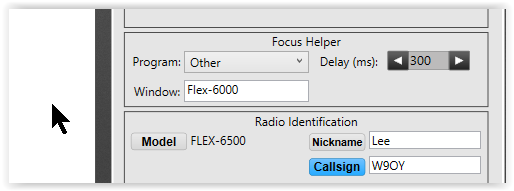
I also set up the focus manager in the radio under Settings>RadioSetup


I couldn't get the N1MM choice to work in the Window dropdown so I filled in Flex-6000 and it worked.

I decided to add a skimmer link to a N1MM band map


This allows skimmer/SDR-Bridge to populate the band map through a Telnet local loop link.  Call signs can then be extracted from off the air (no internet) and used to populate N1MM+'s entry window


Here K5TQ is noted on skimmer.  I click that and he is transferred to a "pre" QSO state in the logger


If decide to call him, I click his call sign and he is transferred to "ready to log" status.  


I copy the exchange and I'm on to the next contact, very effective. 

If I get a dupe it lets me know


To set up the skimmer telnet local loop was easy


In the logger screen choose tools>Telnet Window Tools 

Which opens 


Choose localport as the cluster and edit list


Edit the port number to 7310 and hit OK

Then connect to localport and type in your callsign.  Skimmer sends out spots on local port 7310 so the band map should start to populate


I'm sure that just scratches the surface of the feature set of N1MM+.  I didn't set up the keyer or macros or messages.  I just programmed a couple messages in my keyer and in short order had 100 pts in the log

Mucho Funno

73  W9OY


Saturday, June 4, 2016

DU7ET Phillipines


Friday morning I was headed out the door and saw DU7ET spotted on 40M.  I don't know why but I hardly ever hear the Phillipines especially on the low bands.  I reflexively clicked the spot anyway.  Hope springs eternal.  


Robert was armchair S3 to S5 working simplex.  Almost NO pileup in fact when I called I was the only one calling


He came right back and we exchanged and I had him in the log.


Virtual gray line perfection!  Good op.  

73  W9OY


Too Bad N8MSA say's so long

My friend Greg NI8R turned me onto a sight that I find very interesting.  Unfortunately it looks like I got there a couple weeks late.  It's the site of Mike N8MSA and he has some interesting ideas about ways to standardize comparison of SDR's.  My opinion is the ARRL's format of testing and even Sherwood's list are not granular enough and measure the wrong things.  SDR can be done in several architectures but the bottom line is what way the information is presented to the operator.

Here is a response I posted on the Flex community list regarding buying a 6300 v 6500.  I own both:

"I have both radios and find the 6500 far more versatile.  The 6xxx series radio is an interface between the operator and the band.  As such it presents both visual and aural information to the operator.  I look at the 6xxx panadapter as 2 receivers, a visual receiver overlain with a aural slice, or possibly 2 aural slices.  It turns out however it presents much more data.  The waterfall for example presents history and persistence.  CW skimmer presents a kind of intelligence.  So what the radio can present in the 6500 is far more data in more versatile ways.    You can have one pan with a fast waterfall and one with a slow waterfall, you get 2 different dimensions of history.  CW skimmer presents a kind of intelligence to the data it collects.  2 CW skimmers on 2 pans with 2 DAX channels do not present identical data  One skimmer will decode different stations the other skimmer does not see so more data is presented by 2 skimmers  So what the radio can present in the 6500 is far more data in more versatile but yet readily understandable to the op 

I'm a low band DXer.  Often lets say in the case of an Indian ocean DXpedition I will set up 2 pans with 2 slices in one and and once slice in the other.  I will set up one slice on the DX or at least where the spot of the DX says they are, and lock that slice.  I will then start using the other 2 slices to click around and start copying different waves of EU stations working the DX as they gray line approaches them.  By listening to the activity I get some good idea of propagation and the skill of the operator and some idea of his pattern.  As the gray line approaches me I can start to hear farthest east US ops begin to make contact.  About an hour later is when they gray line finally hits me and I'm very informed about this operation.  You can do this with a 6300 but it's more robust with a 6500.

I use the same setup to work very wide DX pileups like the 40khz wide variety.  I set up one pan zoomed into about a 20khz wide pan with 2 slices, and a second pan zoomed out to the full width of the pileup with one slice.  I will have 2 skimmers running collecting data with one skimmer tuned high in the pileup and one tuned low.  I will have each skimmer set up so if I click tune on the skimmer TX falls to that slice.  This way I can monitor much more skimmer data and where stations are located in the pileup.  If I hear the DX calling somebody I invariably know where the station being called is in the pile up because I've been studying the pile up and I can rapidly click to that part of the 40khz pileup so my transmitter is very close to where his receiver is tuned.  It also makes it easier to discern the ops listening pattern, like he makes a contact and then tunes up 500hz so tail ending is not an effective strategy, tuning up 500 or 1000 hz is an effective strategy.  You get some of this with a 6300 you get more with a 6500.

I've set up a kind of SO3R for bandfils in DX contests.  I'm generally not part of a contest to make the most contacts, I generally join in to give contacts and get band-fils.  With writelog SDR-Bridge and skimmer I have setup my radio with 3 pans on 3 bands, 3 writelog band maps, populated by 3 skimmers and a a spot client.  This mines therefore a huge amount of data on 3 bands.  by linking to my spot collector database and DXkeeper which is my logbook I can easily check my needs against the 3 band maps.  Quite powerful.  You can do 2 with the 6300.  You can do 4 but for me it becomes unwieldy

You can monitor for 6M band openings on one pan while working DX splits on another band.

I ran 2 top ten DX peditions, on 2 bands, in 2 pans, with 2 slices in each pan, driving 2 DAX channels to 2 CW skimmers, one for each DX pedition.  The pans and skimmers were each setup for independent click tuning of the TX slice either in the pan or in the appropriate skimmer, and TX would follow where I clicked.  My station is set up so the antennas and amp band follow the TX slice.  I used a broad band RX loop for RX and switched to full duplex.  So I could hear 2 top 10 DXpeditions on 2 bands in full duplex simultaneously and click tune my transmitter/amp/antenna anywhere in either of the 2 pileups.  A 6500 exclusive 

I use the preamp/attenuator in the 6500 extensively.  I work many stations only 1-2 dB out of my noise and being able to move the dynamic range up and down rapidly in the noise to get best SNR is extremely useful.  I often need to kick in some preamp when I switch to the RX loop.  I have all of those preset in macros with DDUTIL so I can hit one macro and the RX loop kicks in and the preamp goes to +10 or I can hit it again and it toggles back to antenna 1 with -10dBm attenuation.  I have about 5 permutations of this for various bands and antenna configurations.  Some of this can be done in the 6300 but the subset of choices is inferior compared to the 6500."

The OP responded he really wanted to know would the different clock speed make a difference in how CW works in the radio.  My experience is it makes no difference but some people are incredibly particular about their "CW experience" so the answer is UNKNOWN because it s the information presented to the operator that determines what's important.  All of the magic I described meant nothing.  So I am glad Mike took it upon himself try try and come up with a scheme to rationally compare SDR's 

73 W9OY