Thursday, January 21, 2016

Sometimes the Planets Align VP8STI South Sandwhich


I managed to log VP8STI early this morning.  That South pole path has not traditionally been easy from my QTH.  I've heard VP8STI since the first day and have called and called but they have been very weak, and the pileups prodigious.  I do like the high speed contest style exchange BUT given fluttery nature of their signal, the cops and tuner uppers, the high speed has proven to be more of a hindrance than an advantage.  

It's been cold in Florida.  So last night I went to bed early about 21:00 with my heating blanket cranked.  The human bladder is an amazing alarm clock.  There are stretch receptors in the bladder wall and as they stretch they assault the consciousness (and unconsciousness) with an ever increasing barrage of input.  Eventually the assault will not be ignored.  By the time you reach your 7th decade you realize you do not control your bladder, your bladder controls you.  I'm of an age where I now have a 5 hour bladder.  Sure enough at 2:10 mother nature woke me.  After I reset the stretch receptors I pondered whether to return to my cozy bed on this chilly Florida night, or head down to the shack to hear what I could hear.  

Disappointing.  There was a pileup of maybe 4-6 stations but the VP8 was watery and weak on my 40M vertical, my preferred band.  I could make out the VP8 but he was working JA after JA waaaay down in the mud.  I noticed on my grayline map it was JA sunset so he was working their grayline as hard as he could.  I could even hear some JA's as their grayline was also  enhancing signals to my QTH.   He was doing about 40 wpm with no real flutter and some QSB, actually very readable, but I had little hope I was going to crack the Asian express.  I decided to wander around to other spotted freqs to hear what I could hear.  On 30 they were running RTTY and invisible on my panadapter, but I could see some stalwart RTTY boys churning away for a contact.  On 160M nothing.  The VP8 was already over an hour into daylight and I figured my warm bed was calling.  Likely the best I could hope for was a rapid descent of his signal into my noise.


Note the JA sunset

As I returned to 40M for a last listen, he was considerably louder.  I thought ??? and then remembered they were going to be using some kind of directional antennas on the low bands.  On 40M it turns out they are running a 4 square which was working as advertised, and the beam was now on the USA.  

There still wasn't much of a pileup, now maybe 10 stations 


I fired up the amp (love that instant on), quickly checked to see if I was tuned and found a station to tail end all in the matter of 10 seconds.  5 seconds later he was in my log


Here is his signal strength (VFO A)


My band noise was running under S0 maybe -121 dBm.  

This evening I was confirmed in his log


As I made some screen shots for this blog post the pileup continued to build.  Like I said sometimes the planets align.     

So for all of my plans of using multiple panadapters and skimmer screens to scour the pileup in the end it comes down to right place right time, same as always.  By 3 a,m, I was back in bed.  

I stopped by my shack on the way out to work about 7 a.m. and there were still stations working him, at least 5 hours into his daylight on 40 CW.  As I left I realized it was now my turn for the grayline terminator to be flying over my head.  These VP8 ops are some very seasoned and smart operators.  The op I worked was Axel DL6KVA.  He has a tip of my hat!

Here is a video


73  W9OY


Monday, January 18, 2016

Big Pileup Management VP8STI


South Sandwhich and South Georgia


The VP8STI activated today, and the pileups are ridiculous.


The DX is on 7.025 and the pileup extends to 7.40 or beyond

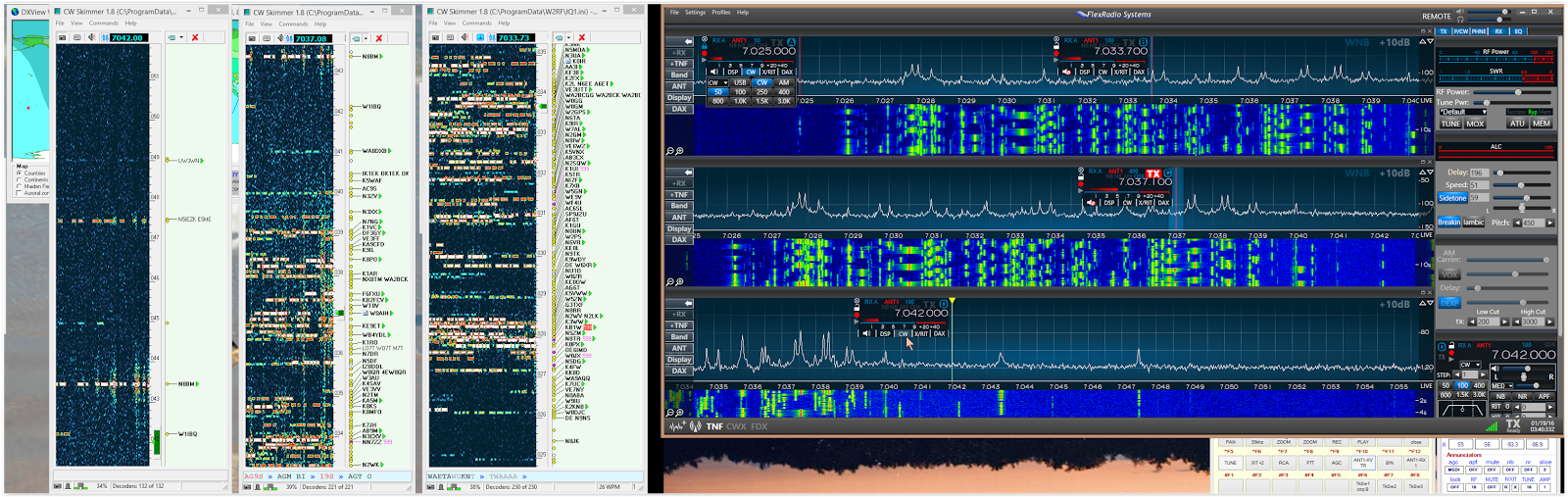
So how does one manage the available information and try to make a reasonable stab at placing ones transmitter where the DX might be listening?   Here is how I set things up using the Flex 6500.  The 6500 has 4 possible "receivers".  I set up 3 to cover the band using 2 different methods.  In the top panadapter there are 2 receivers called slices.  Slice A is the slice I am listening to.  The DX is on 7.025 and I have this receiver locked onto 7.025 so if I inadvertently click something the DX stays in my headphones


note the blue lock above my cursor

Slice "B" is one of my transmitters.  You will note the red TX is active in this slice on 7.0299 in the above pic.  If I hit the key I transmit here, BUT I can also transmit using the slice in the second panadapter


By clicking the Flag Pole in this slice the top of the pole turns yellow and the transmitter is now active on 7.0357 and if I hit the key I transmit here (note the red TX has shifted to this Flag).  The reason I use this setup is I am also monitoring CW skimmer


The skimmer panel on the right goes to the top panadapter and I can decode CW from 7.025 to about 7.035.  The skimmer on the left goes to the bottom panadapter and decodes from about 7.033 to 7.043.  When a station sends 599 or 5NN 599 is printed in red next to this frequency.  By watching the callsigns and the 599's, you quickly learn the distribution of calls in the pileup and you can see something of the pattern of the DX op as he moves or doesn't move through the pileup.  This setup allows me to monitor a little more than 20 khz of pile up with a good knowledge of what is happening in the pileup  If the pileup was 30-35 khz I would simply open up another panadapter and crank up another skimmer


And my desktop would look like this.  If I click on any station or any 599 or any spot on any panadapter my transmitter is immediately scooted to that freq ready for action
The progran that cooridinates all of this is W1RF's SDR-Bridge 


A third party program written by Ed W1RF 

So far the DX has eluded me.  He is there but damn weak and way too much QRM on his freq to make the trip so I decided on writing a blog post while I listen and hope for improvement.  You can get most of this functionality on the 6300, but the 6500 really shines for this advanced pileup busting!

73  W9OY


Saturday, January 16, 2016

K5P Palmyra


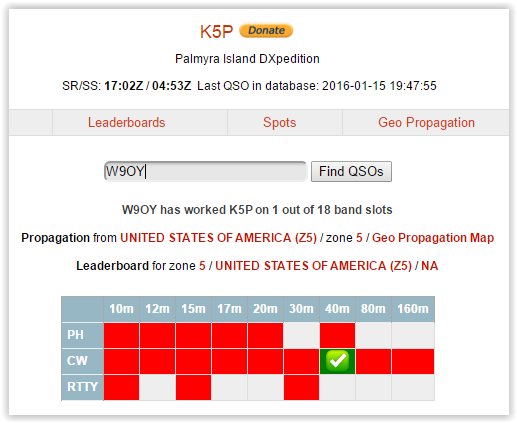
I haven't been too active lately especially on DX.  I've been involved int the Alpha testing program with Flex radio and a new SSDR version was just released and working out the kinks is both interesting and time consuming.  After 1.6.17 was released I was on 40M CW and Craig K9CT gave me a call.  Craig is a well known DXer, contester and also a Alpha group member.  In the course of conversation he mentioned he was heading to Palmyra for a DXpedition.  Palmyra KH5-P is a top ten most wanted DX need.  It's an atoll about 1000 miles south of Hawaii close to the equator, and is protected as a natural environment by the US government.  I needed me some KH5-P so I decided to stay tuned.  I figured it would be easy... Man was I wrong.  Between being equatorial and the band conditions lately, I've had virtually NO PEEPS out of KH5 


I listened the morning they fired up and they were readable on 40M but I needed to go pass the gas (anesthesiologists joke) and the pile up was BIG so I didn't make the trip.  I figured noproblemo.  I spent the next 3 days trying to get a contact.  Things went from bad to worse as far as conditions were concerned, and I resorted to getting up in the wee hours to try my luck on 40M.  I listened dutifully on the other bands but 40 was my best shot.  


Desktop 

I set up my desktop for DXing and here is a shot of the pileup


Not too bad.  The op was ND2T.


You can read Tom's bio by clicking the pic.

His pattern was to work on the same freq moving occasionally, so the trick was to figure out where he was listening.  I tried various techniques but wound up resorting to using a freq suggested in a spot comment in Spot Collector.  Hey any port in the storm!  He was totally weak


VFO A is the RX VFO he is literally 2 dB out of the noise, dipping below the noise with QSB.  VFO B is the pileup

Tom is an excellent op and he managed to get my callsign and persevere until I was safely in the log!


I published a video of the DXpedition and conditions at my QTH the morning I worked them.  You definitely need headphones to listen to this one


good time  

73  W9OY


Friday, November 20, 2015

VK9WA Willis Islets


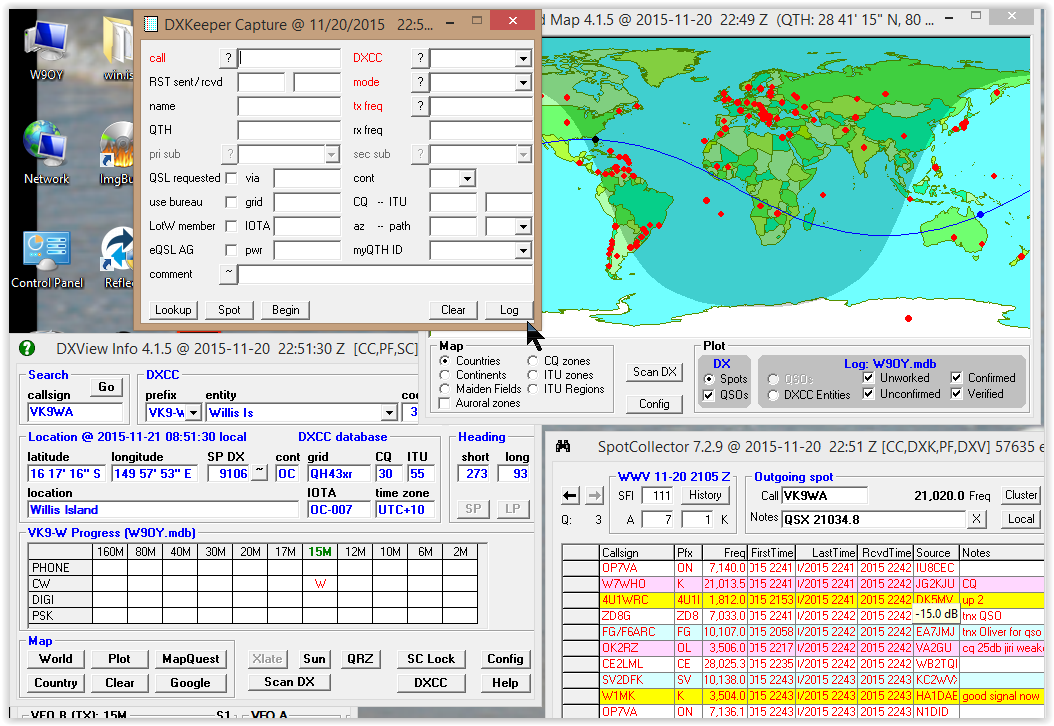
I decided to give the VK9WA DX pedition a swing out on the middle islet of the 3 islet chain east of Australia.  I listened this morning (Friday) on 80 CW and could barely hear them because of QRN.  It was just at dusk this evening and I was in my office and I decided to check the EHAM  cluster link and Willis was on CW on 15M.  I went into the shack without much hope since my set up on 15 is pretty dismal, a W5GI antenna at 25 ft and a full size 80M vertical were my antenna choices.  I checked which antenna had the best copy and it was the W5GI so I elected this antenna for both receive and transmit.  Here is a shot of the S meter on this antenna


Pretty damn quiet!  VK9WA was solid Q5 but only 5 dB above the noise with a dab of QSB so this could be a tough circuit, given the size of the pileup.  I fired up the amp and tuned up to about 800W and started to analyze the pileup


I had 2 skimmers running and the pile was spread over about 16khz


He was starting to get weaker as sundown had occurred and I knew I better get on the stick.  He was flipping around the pile but he would stop at a spot and work a few before moving on somewhere else.  I grabbed him in 3 calls up 14 or so.


In the few minutes required to write this post he had faded into oblivion at my QTH.  There was still some skimmer activity coming through from the west coast but nada from the Atlantic coast.  Fun times!!  

73  W9OY

Update got them on 17CW in one call using my 80M vert and about 1KW


Nice sized pileup


Really good OP.


73  W9OY


Tuesday, October 6, 2015

Full Duplex SSDR v 1.5


SmartSDR now allows for full duplex operation.  In the pic above FDX is turned on.  The top receiver is tuned to W1AW on 40M and the bottom RX is on 30M.  The TX is also on 30M.  The TX antenna is a full size 80M vert tuned to 30M, and the RX ant is a 80M dipole.  Antenna separation is 100ft.  Power is set to 80W.  Included is a video of how the radio operates in full duplex mode 


Amazing!!

73  W9OY

Sunday, September 13, 2015

Remote CW part Due

I acquired all the parts to build IW7DMH's Remote Morse Key.  Here is a pic of my Arduino with ethernet that I plug into the key port of my 6500


The finished board consists of a Arduino UNO R3, a HanRun Enc28J60 ethernet shield, a prototype shield, a 4n35 optoisolator a couple of resistors and a DB9 connector and housing from radio shack


The DB9 was particularly nice since I could include the 6.8K resistor and 100nf bypass inside the case and a RCA female connector exactly fit as well, making for a nice tidy construction.

Most of the parts were purchaded from China off ebay. including the Arduino, the Ethernet shield, the Prototype board, and the 4n35.  I used a 8 pin radio shack socket I had in the junk box to socket the 4n35.  All totaled the Chinese parts were $9.69

Arduino  $3.69

HanRun $2.77 with shipping

Prototype $2.17 with shipping

4n35 $0.99

The Arduino came with a USB cable, and the prototype came with a bread board, which I did not use.  It turns out the prototype board has some switches and LED's already on board so I wired up one LED to pin 7 which is the output pin so I could watch my CW as well.

It was interesting to learn how to load a program into the Arduino.  I have programmed raspbury pi and beagle bone black computers in the past, but this was my first swing at a Arduino and I knew absolutely nothing about it.

You start by installing a IDE programming tool downloaded from arduino.cc
Make sure you use Arduino.cc as there are 2 competing groups out there and not everything is compatible in both camps.  The libraries used in this project are .cc compatible and I'm not smart enough to modify or debug if things go south.  The code is C/C++ and is straight forward.  I've never used C++ but I was able to
 write and load some little routines to get a feel for how things work.  The point being it ain't very scary.  Once I got ethernet going I was able to configure and ping both fixed IP and DCHP addresses


The remote board requires no connection to a computer, just 5v and a way to the router.  In my shack I have a 5 port switch which connects my computer. my 6300, my 6500 and now this remote CW switch back to my router.

Enzo and Ihad to do a little troubleshoot as I couldn't get any packets to pass in the version of the "sketch" I was using.  (A sketch is what the little program you write is called), but after some chin scratching we got the sucker running.

On the remote computer there is a little program tha connects the keyer to the switch.  I use a little K1EL battery powered K12 keyer to drive the DB9 serial port.  My computer has 2 DB9 serial ports, neither of which would work.  I did have a USB<> serial port in the junkbox so I plugged that in and set the program correctly and it fired right up


What the program does is send out UDP packets on port 6000.  Since I use a lo
cal keyer (K12)  I only use one of the possible 2 connections, specifically CTS or pin 8

With a key output closure from the keyer a L1 packet is generated on port 6000.  When the closure ends a L0 packet is generated.  The arduino sniffs port 6000 looking for L1's and L0's.  When it senses a L1 it turns on the 6500.  When it senses L0  the 6500 turns off.  There is a means to sends Iambic output but I didn't bother with that.  I like having the sidetone, speed controls and memory function/buttons of the keyer local.

How's it work?  It works great!  The lag is considerably less than the winkey remote setup, it's WAY cheaper, and no computer is needed to run the connection.

Included is a video of the keyer in action


I set the 6500 to full breakin, but I turned the power to 0 watts so as not to interfere.  Almost NO lag and perfect code!

My first contact was PV8ADI running a little pileup on 20M  Broke him first call with 100W on a vertical.  Much superior to the WinKey setup for DXing and ragchew.


Here is a pic of my remote CW setup, N3ZN SL-1 paddle and a K1EL K12 keyer in a Altoids tin.  The keyer drives the Remote CW program in my computer via a serial port in the following fashion

Paddle > Keyer > serial port to computer > Remote CW program >   ......Ethernet......  Arduino > 6500 in the shack.

73  W9OY

Friday, August 14, 2015

Remote CW

Well I've been hankering for remote CW using a paddle.  I've developed peripheral neuropathy in my hands and it's completely destroyed my typing speed and accuracy.  I was hoping for a inbred Flex solution, and that may one day come, but so far no go.  There are a couple of choices.  One is the K1EL remote server.  This uses 2 K1EL keyers, one at the transmitter and one remote, and 2 computers, one local to the transmitter and one remote.  There are 2 versions of the keyer that will work, thge USB winkeyer and the serial winkeyer.  You can mix and match.   The keyers are joined by a K1EL program called winkey remote whch sets up a server and client complete with IP addresses 


This is my client.  It connects my winkey V3 at the remote to my winkey V2.2 next to the radio.  The paddle plugs into V3 and V2.2 plugs into the radio.  Here is a video of performance


It's OK for rag chewing or casual DX but too laggy for pileups or contests.  The lag is not due to the Flex.  My lag in the Flex circuit is microseconds.  It's a fairly expensive solution (two  keyers needed) for fairly mediocre performance.  

Another solution suggested by Enzo IW7DMH is a Arduino setup he created.  In this setup he takes a standard Arduino Uno R3 and an Ethernet dongle to connect the remote computer.  The Arduino resides next to the radio and is plugged into the radio's CW port and the local LAN.  On the remote computer the key plugs into a serial port and a little program on the remote computer connects the Arduino to the key.  I haven't built this circuit yet but I have the parts on the way from China.  Total parts cost plus shipping is under $10.  Here is a video of Enzo's creation in action.  


Once I get it working I will update.  In the meantime I'm trolling 40 CW!!

73  W9OY